By Paul Hochman
Gear and technology editor
TODAY
updated 5:03 p.m. ET May 30, 2007
In the next year, Bill Gates will manage one of the highest-profile transitions in American business history — he’ll leave his day job as chairman at Microsoft, the $300 billion company he co-founded 32 years ago, and will move full time into philanthropy.
But before he leaves, Gates has a few more high-tech projects to finish. Until this morning, one project — almost five years in the making and code-named 'Milan,’ — was top-secret.
In a TODAY exclusive, I had a chance to talk with Gates at Microsoft’s Redmond, Wash., campus about a revolutionary new device Microsoft now calls “Surface.” (MSNBC.com is a Microsoft-NBC Universal joint venture.)
Showing posts with label Microsoft. Show all posts
Showing posts with label Microsoft. Show all posts
Microsoft unveils revolutionary device
List of mergers and acquisitions by Microsoft
Microsoft is an American multinational computer technology corporation based in Redmond, Washington. Bill Gates and Paul Allen founded the company in Albuquerque, New Mexico on April 4, 1975 after Gates went on leave from Harvard University.[1] Micro Instrumentation and Telemetry Systems (MITS), the company that created the Altair 8800 microcomputer, was based in Albuquerque. Gates visited MITS to show them his implementation of the BASIC programming language using their system.[2] Microsoft moved its headquarters to Bellevue, Washington on January 1, 1979,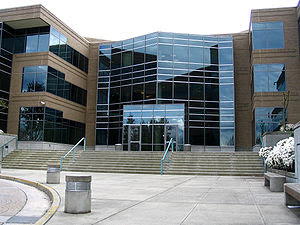
and then to Redmond on February 26, 1986, where it still remains.[3] The company's initial public offering was held on March 14, 1986. The stock, which eventually closed at US$27.75 a share, peaked at $29.25 a share shortly after the market opened for trading. At the time, Gates owned 45%[4] of the company's 24.7 million outstanding shares, and Allen owned roughly 25% of the shares. After the offering, Gates was worth $233.9 million and Microsoft had a market capitalization of $519.777 million.[5] Microsoft has acquired 128 companies, purchased stakes in 60 companies, and made 24 divestments. Of the companies that Microsoft has acquired, 99 were based in the United States. Microsoft has not released the financial details for most of these mergers and acquisitions.
Microsoft's first acquisition was Forethought on June 29, 1987, which was founded in 1983 and developed a presentation program that would later be known as Microsoft PowerPoint.[6] On December 31, 1997, Microsoft acquired Hotmail for $500 million, its largest acquisition at the time, and integrated Hotmail into its MSN group of services.[7] Hotmail, a free webmail service founded in 1996 by Jack Smith and Sabeer Bhatia,[8] had more than 8.5 million subscribers earlier that month.[9] Microsoft acquired Seattle-based Visio Corporation on January 7, 2000 for $1.375 billion. Visio, a software company, was founded in 1990 as Axon Corporation, and had its initial public offering in November 1995.[10] The company developed the diagramming application software, Visio, which was integrated into Microsoft's product line as Microsoft Visio after its acquisition. On July 12, 2002, Microsoft purchased Navision for $1.33 billion. The company, which developed the technology for the Microsoft Dynamics NAV enterprise resource planning software, was integrated into Microsoft as a new division named Microsoft Business Solutions,[11] later renamed to Microsoft Dynamics.[12] Microsoft purchased aQuantive, an advertising company, on August 13, 2007 for $6.333 billion, Microsoft's largest acquisition. Before the acquisition, aQuantive was ranked 14th in terms of revenue among advertising agencies worldwide. aQuantive had three subsidiaries at the time of the acquisition: Avenue A/Razorfish, one of the world's largest digital agencies,[13] Atlas Solutions, and DRIVE Performance Solutions.[14] Microsoft acquired the Norwegian enterprise search company Fast Search & Transfer on April 25, 2008 for $1.191 billion to boost its search technology.[15]
Since Microsoft's first acquisition in 1987, it has purchased an average of six companies a year. The company has purchased more than ten companies a year since 2005, and acquired 18 in firms in 2006, the most in a single year, including: UMT-Software and IP Assets, MotionBridge, Seadragon Software, Apptimum, Onfolio, Lionhead Studios, AssetMetrix, Massive Incorporated, Vexcel, DeepMetrix, ProClarity, iView Multimedia, Winternals Software, Whale Communications, Gteko, DesktopStandard, Colloquis, and Accipiter Solutions. Microsoft has made four acquisitions worth over one billion dollars: aQuantive, Fast Search & Transfer, Navision, and Visio Corporation. Microsoft has also purchased several stakes valued more than a billion dollars. It obtained an 11.5% stake in Comcast for $1 billion, a 22.98% stake in Telewest Communications for $2.263 billion, and a 3% stake in AT&T for $5 billion. Among Microsoft's divestments, in which parts of the company are sold to another company, only Expedia, Inc. was sold for more than a billion dollars; USA Networks purchased the company on February 5, 2002 for $1.372 billion. On August 17, 2006, Microsoft acquired 7.92% of its own common stock for $20 billion.
Experience Microsoft Surface
There are many innovative gadgets in the market. Software and hardware, now offer a lot of excitement. Imagine the ideal combination of hardware and software. The result – Microsoft Surface. You may go though the many videos on Internet to experience Microsoft Surface features. These videos released by Microsoft deal with real life applications and not simple PowerPoint presentations. Seeing is believing. customers.
Intelligent tables? Yes. They will be. Imagine you going to a restaurant and place a wine glass on the table which is actually a Microsoft Surface. The wine menu appears. You select the wine of your choice and the order is received by the staff, without a single word of verbal communication. And only one needs to order? No. This accepts multiple ‘touch’ and many people may select the item on the menu and drag the item they want to order with their fingers to place the order. Starwood Hotels & Resorts Worldwide has tied up with Microsoft to enable you to experience Microsoft Surface in their place.
Another demo shows how to experience Microsoft Surface by comparing two mobile phones. Just place a mobile phone on the Microsoft Surface. The system identifies the same (probably with a special barcode?) and displays the specifications and prices. You place another mobile phone on the Microsoft Surface. The specifications for this are also shown. When you slide the mobile phones together, a comparison of both is shown, to enable you to decide to buy the one that suits you.
Today’s computers allow you to have multiple applications in multiple windows. But they may have only one key board and one mouse. And only one person can operate at a time. If you want to watch photo album on your computer along with three or four of your friends, just imagine every one trying to see them. Microsoft Surface allows people to sit across in different positions and watch the images. Spread the photos across the Microsoft Surface and any one can pull photos towards them like you pull physical photos, with fingers. Turn them as you like. You can zoom in or zoom out just by pulling the opposite corners of the image with your hands. Can you wait to experience Microsoft Surface? You can even play multiple videos on the surface just by tapping the video file with your finger, like we do now with a mouse!
In future, you can experience Microsoft Surface even with your digital camera. You take pictures on your digital camera. There will be no need to connect the USB cable or upload through Bluetooth or wireless. Just place the digital camera on the Microsoft Surface and watch the images on the surface. We bet you are eager to experience Microsoft Experience.The Power of Microsoft Surface
Multi-touch technology allows multiple inputs from multiple users. Microsoft Surface is one product that leverages multi-touch technology. For example, one can draw four lines with four fingers on a Microsoft Surface. You may activate the paint tool box on the screen, dip your fingers in different colors and draw on the Microsoft Surface. You can see the power of Microsoft Surface yourself, as the lines of different colors appear as you draw with your fingers. The power of Microsoft Surface allows many people to work simultaneously on the Microsoft Surface, by sitting around it.

Hospitality businesses like restaurants, hotels, retail businesses, and public entertainment venues will be bringing you the power of Microsoft Surface soon. Many applications are being built around the Microsoft Surface. The applications may need to be customized to a specific use before the third party developers start creating different applications.
Harrah's Entertainment, Starwood Hotels and Resorts, T-Mobile and IGT are a few companies that have signed up to bring the power of Microsoft Surface to their customers.
It appears that the restaurants will be an easier target as interesting applications can be built around the Microsoft Surface. The Wine glasses and Beer mugs can be identified by the Microsoft Surface, when placed on the surface. Each of these may be labeled with a special code (like barcode), which is read by the Microsoft Surface. If a beer mug is placed on the surface, the menu related to Beer appears on the surface. The user need to just select the item and the order automatically reaches the bartender. That is the power of Microsoft Surface.
About Microsoft Surface
After establishing the lead in software industry, Microsoft toyed with various hardware. We saw xBox, Zune etc. Then a bigger project was under development under code name Milan, which was all about Microsoft Surface. Milan was aimed to leverage the perfect combination of hardware and software. Manipulating digital content using hand gestures, motions and physical objects is all about Microsoft Surface.

Many had a wrong impression about Microsoft Surface. They thought it is another glorified and hyped touch screen computer. And they are proved wrong by the features provided in the Microsoft surface. The touch screen computers enable users to do away with keyboard and mouse. They can navigate the menu by touching various options to reach a logical end of viewing data or printing. And there ends the comparison. Microsoft Surface can do many more things, which you think are not possible!
What is so special about Microsoft Surface? One can touch a color in the one-screen palette and draw an image on the screen. Touch blue and draw the sky, Touch green and draw grass. Microsoft Surface can understand all this. It also recognizes various objects. The system can be designed to set up a plate on the surface and the system throws up a menu! And many more possibilities await us as we progress.
How can Microsoft Surface identify the fingers and objects? The technology itself is not new. It is called Multi-touch. University of Toronto had some pioneering work on multi-touch tablets and Bell Labs on multi-touch screens, way back in early 1980s. Steven Bathiche of Microsoft Hardware and Andy Wilson of Microsoft Research conceptualized leveraging multi-touch and thought about Microsoft Surface as product in 2001.
Microsoft formed a team in October 2001 to make Microsoft Surface a reality. The work went on briskly and a presentation about Microsoft Surface was given to Bill Gates in 2003. The first prototype was nicknamed T1 and the development team designed specific applications like photo browser, puzzles, games etc. After building more than 80 prototypes, the hardware design was frozen in 2005.
Experience the Tabletop Computer
It is as significant a progress in user interface technology as the progress from DOS [Disk Operating System] to GUI [Graphic User Interface]. Many research reports prove that a large number of people are intimidated and isolated by today’s technology. Many features available in mobile phones, personal computers and other electronic devices like digital cameras aren’t even used because the people aren’t as aware of the features and benefits as they should be or they aren’t as comfortable with the technology to enjoy those features Check the videos for all sorts of goodness of it being used for all sorts of applications, such as playing with photos, wirelessly pulling photos off a camera, map navigation and reservations, ordering and paying for food using credit cards.
Microsoft Surface - Is it really special?
What is so special about Microsoft Tabletop? One can touch a color in the one-screen palette and draw an image on the screen. Touch blue and draw the sky, Touch green and draw grass. Microsoft Tabletop can understand all this. It also recognizes various objects. The system can be designed to set up a plate on the surface and the system throws up a menu! And many more possibilities await us as we progress.

Many had a wrong impression about Microsoft Surface. They thought it is another glorified and hyped touch screen computer. And they are proved wrong by the features provided in the Microsoft Tabletop. The touch screen computers enable users to do away with keyboard and mouse. They can navigate the menu by touching various options to reach a logical end of viewing data or printing. And there ends the comparison. Microsoft Tabletop can do many more things, which you think are not possible!
There are four main components being important in it's interface: directinteraction, multi-touch contact, a multi-user experience, and object recognition. This device also enables drag and drop digital media when wi-fi enabled devices are placed on it such as a Microsoft Zune, cellular phones, or digital cameras. It features multi-touch technology, that enables multiple points of contact.
This technology allows non-digital objects to be used as input devices. This means that the source of information does not necessarily have to be digital in form.This is because,the technology does not rely on restrictive properties, such as the capacitance, electrical resistance, or temperature of the tool used
Direct interaction: Facility to manage digital information with hand gestures and touch instead on mouse and keyboard.
Multi-touch contact: User need not use only one finger to manage digital data. If user dips five fingers in five different colors in the on screen paint palette and draws five lines with five fingers, you get five lines with five colors
Subscribe to:
Posts (Atom)